

blog · Robotics & DIY Projects
Can You Build a Robot for Under Rs. 5,000 in Pakistan?
Can You Build a Robot for Under Rs. 5,000 in Pakistan?
What if we told you that you could build your very own robot for less than the price of a decent pair of headphones?
Not a toy that simply moves when you press a button.
We're talking about a robot that can detect obstacles, make decisions, change direction, and navigate around objects — all by itself.
And the best part?
You can build one for under Rs. 5,000 in Pakistan.
Whether you're an engineering student, an electronics enthusiast, or someone who has always wanted to explore robotics, this guide will show you how to get started without spending a fortune.
1. Meet Your First Robot: The Obstacle-Avoiding Car
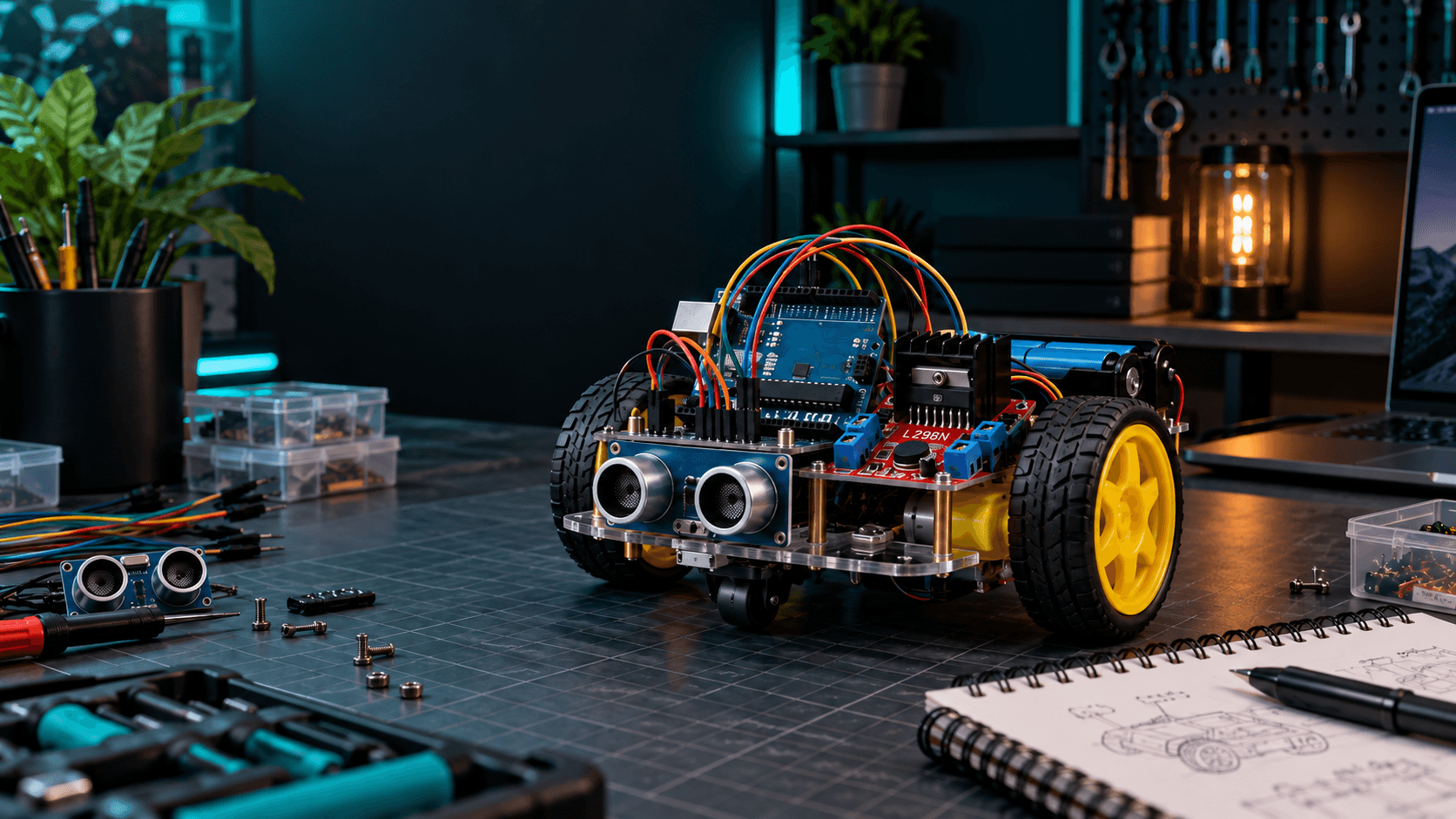
Our project is a simple two-wheel-drive robot that uses an Arduino and an ultrasonic sensor to detect obstacles.
Here's how it works:
- The robot moves forward.
- Its ultrasonic sensor continuously checks the distance ahead.
- When an obstacle gets too close, the robot stops.
- It reverses slightly.
- It turns and continues moving.
No remote control required!
This type of robot introduces several important concepts in electronics and programming:
- Microcontroller programming
- Sensor interfacing
- Motor control
- Distance measurement
- Decision-making algorithms
- Embedded systems
- Basic robotics
These concepts form the foundation for more advanced robotic applications, including autonomous vehicles and industrial automation.
2. What Components Do You Need?
You don't need expensive motors, complicated sensors, or professional robotics equipment.
Here are the main components you'll need.
Arduino UNO R3 — The Brain
Reference Price: Rs. 1,100
The Arduino UNO R3 acts as the brain of your robot.
It receives information from the ultrasonic sensor and sends commands to the motor driver.
For this project, an Arduino UNO R3 compatible board is sufficient. You don't need an expensive development board with built-in Wi-Fi or Bluetooth.
2WD Robot Chassis — The Body
Reference Price: Rs. 1,000
A basic two-wheel-drive chassis kit generally includes:
- Acrylic chassis
- Two DC gear motors
- Two wheels
- Caster wheel
- Motor mounting hardware
- Screws and nuts
- Battery holder
The chassis provides the mechanical structure that holds your components together.
A two-wheel-drive design is particularly suitable for beginners because it is easy to assemble and requires only two motor channels.
L298N Motor Driver — The Muscle
Reference Price: Rs. 410
An Arduino cannot safely drive DC motors directly from its GPIO pins.
That's where the L298N motor driver comes in.
It receives control signals from the Arduino and supplies motor current from a separate power source.
It allows you to:
- Move forward.
- Reverse.
- Turn left.
- Turn right.
- Control motor speed using PWM.
The L298N is widely used in educational robotics, although its voltage drop makes it less efficient than some newer motor drivers.
HC-SR04 Ultrasonic Sensor — The Eyes
Reference Price: Rs. 210
The HC-SR04 ultrasonic sensor allows your robot to detect obstacles without touching them.
It sends out ultrasonic pulses and measures how long their echoes take to return.
The Arduino uses this information to estimate the distance between the robot and an object.
The sensor works much like a bat detecting objects through sound.
Jumper Wires and Batteries
Estimated Price: Rs. 500–900, depending on what you already own
You'll also need jumper wires, suitable batteries, an Arduino power connection, and a USB cable for programming.
Use separate, suitable power arrangements for the Arduino and motors, with a common ground.
3. How Much Will the Robot Actually Cost?
Based on indicative Pakistani retail prices, a basic robot can be assembled for approximately:
Rs. 3,500–4,500
Your final cost will depend on the supplier, power arrangement, battery quality, and accessories you choose.
That leaves some room within a Rs. 5,000 budget for additional mounting materials or replacement components.
The estimate does not include delivery charges or tools such as a soldering iron if they are required.
Important: Confirm the final prices and package contents before purchasing. Some chassis kits already include the motors, wheels, battery holder, and mounting hardware, so buying those parts separately would unnecessarily increase your costs.
4. How Does an Obstacle-Avoiding Robot Work?
The entire robot operates through a simple decision-making loop.
Step 1: Measure Distance
The HC-SR04 sensor measures the distance to the nearest detectable object in front of the robot.
Step 2: Send Data to Arduino
The sensor returns a signal that the Arduino uses to calculate the approximate distance.
Step 3: Make a Decision
If the path ahead is clear, the robot continues moving.
If an object is too close, the Arduino changes its motor commands.
Step 4: Avoid the Obstacle
The robot stops, reverses, turns, and begins moving forward again.
This process repeats continuously.
You have now created a basic autonomous robot!
5. Assembling Your Robot
Step 1: Prepare the Chassis
Attach the two gear motors to the acrylic chassis.
Install the wheels and caster wheel.
Make sure both wheels rotate freely and do not rub against the chassis.
Step 2: Mount the Arduino
Secure the Arduino UNO to the chassis using suitable spacers or mounting hardware.
Avoid placing the underside of the circuit board directly against conductive surfaces.
Step 3: Install the Motor Driver
Mount the L298N module where its terminals remain accessible.
Connect the left and right motors to its two motor output channels.
Step 4: Install the Ultrasonic Sensor
Mount the HC-SR04 sensor at the front of the chassis.
Ensure that its transmitters face forward and have an unobstructed view.
Step 5: Prepare the Power Supply
The motors and Arduino have different power requirements.
The four-AA battery holder included with many chassis kits can provide a nominal 6V supply for the motors.
The Arduino UNO should receive a suitable separate supply, such as a 9V battery through a correctly wired, center-positive barrel connector.
A rectangular 9V battery is convenient for introductory testing but may have limited runtime. A suitable regulated power system is preferable for longer operation.
Connect the grounds of the Arduino and motor driver together.
Never connect the motor battery directly to the Arduino's 5V pin.
Step 6: Connect the Sensor
Connect the HC-SR04 sensor to the Arduino using the appropriate jumper wires.
Check every connection before powering the robot.
6. Programming Your First Robot
Once the hardware is assembled, the next step is giving your robot instructions.
Download the Arduino IDE from:
https://www.arduino.cc/en/software
Connect your Arduino UNO using a USB Type-B data cable.
Select the Arduino Uno board and correct COM port.
Your program needs to perform three basic tasks:
- Read the ultrasonic sensor.
- Determine whether an obstacle is nearby.
- Control the motors accordingly.
A simple obstacle-avoidance algorithm looks like this:
START

Measure distance ahead

IF distance is greater than 20 cm:
    Move forward

ELSE:
    Stop
    Move backward briefly
    Turn right
    Continue

REPEAT
The 20 cm threshold is only a starting point.
You can adjust it depending on your robot's speed, sensor position, and stopping distance.
A faster robot generally needs more distance to react safely.
7. Testing Your Robot
Before placing your robot on the floor, test each component separately.
Test 1: Arduino
Upload the Blink example to verify that the Arduino is working correctly.
Test 2: Ultrasonic Sensor
Use the Arduino Serial Monitor to display distance measurements.
Move an object toward and away from the sensor and observe the readings.
Test 3: Motors
Raise the wheels off the ground and test each motor independently.
Check forward and reverse motion.
Test 4: Obstacle Detection
Place an object approximately 20 cm in front of the robot.
Verify that the robot stops and changes direction.
Test 5: Full Operation
Place the robot on a flat, dry surface.
Allow it to move through a simple obstacle course.
Avoid testing near stairs, traffic, water, or fragile objects.
Congratulations! You've built your first autonomous robot.
8. Common Problems and How to Fix Them
The Robot Doesn't Move
Check the battery voltage, motor driver connections, common ground, and motor power supply.
Only One Wheel Moves
Check the motor connections and test each motor output independently.
The Arduino Keeps Restarting
This can indicate an inadequate power supply, voltage drop, or motor-related electrical interference.
Check that the motors are not drawing power through the Arduino's I/O pins.
The Robot Doesn't Detect Obstacles
Verify the ultrasonic sensor wiring and inspect its readings in the Serial Monitor.
The Robot Moves in the Wrong Direction
Check the motor wiring and the direction commands in your program.
The Motors Move Very Slowly
Check the motor supply under load.
An L298N driver has an internal voltage drop, so the motors may receive less voltage than the battery supplies.
A suitable modern motor driver can improve efficiency.
9. Want to Make Your Robot Smarter?
Once your first robot is working, you can upgrade it with additional components.
Add Bluetooth Control
Use a compatible Bluetooth module to control your robot from a smartphone.
Add Line-Following Sensors
Turn your robot into a line-following vehicle that tracks a black line on a white surface.
Add a Servo Motor
Mount the ultrasonic sensor on an SG90 servo so the robot can look left and right before choosing a direction.
Upgrade to ESP32
Use an ESP32 to explore Wi-Fi control, remote monitoring, and more advanced connected robotics applications.
Add Wheel Encoders
Measure wheel movement to estimate speed and distance.
These upgrades provide a practical pathway from beginner robotics toward more advanced embedded systems projects.
10. Build Your First Robot with Sparkonics
Robotics shouldn't be limited to expensive kits or specialized laboratories.
With a few affordable components and a little creativity, anyone can begin learning how intelligent machines work.
At Sparkonics, our goal is to make electronics and robotics components more accessible to students, makers, and developers across Pakistan.
Whether you're building your first obstacle-avoiding robot or preparing a university final-year project, you can explore Arduino boards, sensors, motors, motor drivers, and essential accessories for your next creation.
We also offer convenient delivery to students and university campuses across Islamabad and Rawalpindi.
Final Thoughts: Every Great Robot Starts Small
Your first robot won't be perfect.
It might turn in the wrong direction.
It might bump into a wall.
It might take a few attempts before everything works together.
But every problem you solve teaches you something new.
And before you know it, you'll have built a machine that can sense its surroundings and act on its own.
Not bad for a project that costs less than Rs. 5,000.
Ready to Build Your First Robot?
Explore Arduino boards, ultrasonic sensors, robot chassis kits, motor drivers, and other robotics components at Sparkonics.
Sparkonics — Components for a Brighter Tomorrow.