

Arduino UNO R3 Development Board – ATmega328P DIP
Description
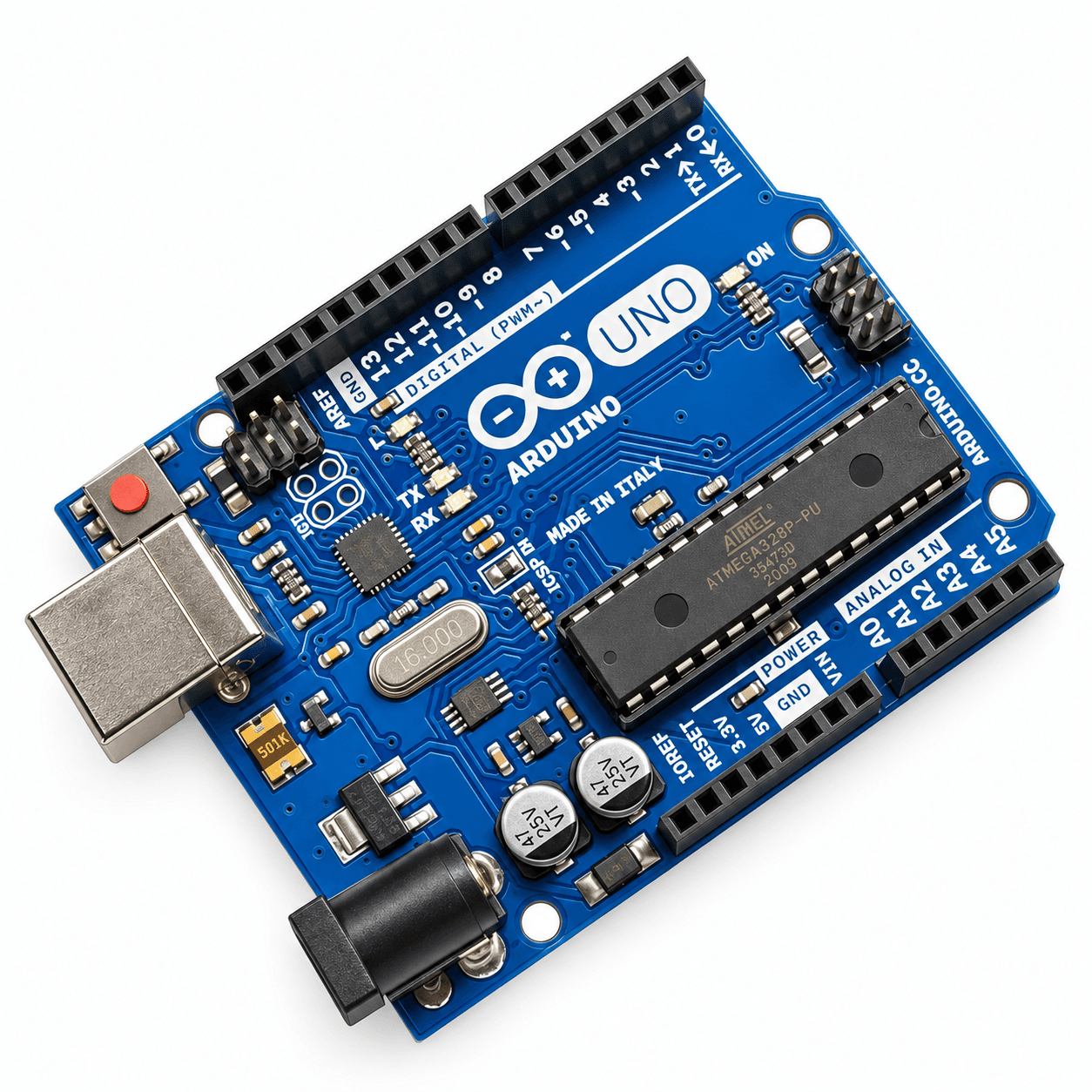
The Arduino UNO R3 Development Board is a versatile and beginner-friendly microcontroller board powered by the ATmega328P 8-bit AVR microcontroller. Designed for students, electronics enthusiasts, and developers, it provides an accessible platform for learning programming, embedded systems, robotics, and electronics prototyping.
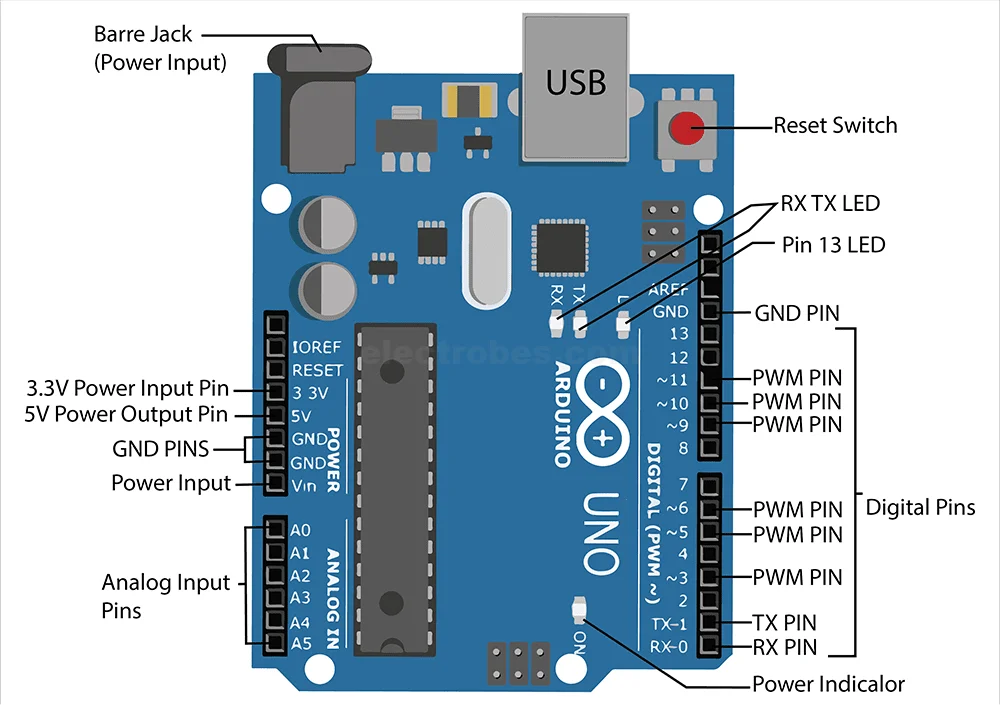
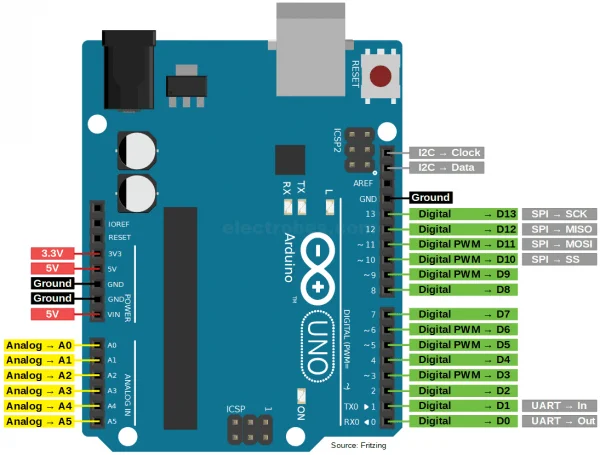
Operating at 16 MHz, the board features 14 digital input/output pins, 6 analog inputs, and 6 PWM outputs, allowing it to interface with a wide range of sensors, motors, displays, relays, and communication modules.
The Arduino UNO R3 can be programmed using the free Arduino IDE and connected to a computer through its USB interface. Its standard UNO form factor makes it compatible with numerous Arduino shields and expansion modules.
Whether you're creating your first LED circuit, developing an automated system, or working on a university final-year project, the Arduino UNO R3 provides a practical foundation for turning your ideas into working prototypes.
Key Features
- ATmega328P Microcontroller: Reliable 8-bit AVR processor operating at 16 MHz.
- 14 Digital I/O Pins: Connect LEDs, sensors, switches, motors, and other electronic components.
- 6 Analog Inputs: Read signals from potentiometers, temperature sensors, and other analog devices.
- 6 PWM Outputs: Control LED brightness, motor speed, and other PWM-compatible devices.
- USB Programming: Easily upload programs using the Arduino IDE.
- Flexible Power Options: Power the board through USB or a suitable external DC power supply.
- DIP Microcontroller: Socket-mounted ATmega328P can be replaced if required.
- Wide Compatibility: Supports numerous Arduino shields, modules, and libraries.
Applications
- Electronics learning and prototyping
- University laboratory experiments
- Robotics and automation
- Smart home projects
- Sensor monitoring systems
- LED and lighting control
- Final-year engineering projects
- DIY electronics and embedded systems
Package Includes
1 × Arduino UNO R3 Development Board – ATmega328P DIP
Note: This is an Arduino UNO R3 compatible development board. A USB cable and additional accessories are not included unless explicitly specified.
Usage guide
Getting Started
- Download and install the Arduino IDE from the official Arduino website.
- Connect the Arduino UNO R3 to your computer using a USB Type-B data cable.
- Open the Arduino IDE and select Arduino Uno from the board selection menu.
- Select the correct COM port.
- Open File → Examples → 01.Basics → Blink.
- Upload the example sketch to verify that your board is working.
- Connect sensors, LEDs, or other components to begin building your project.
Common Applications
1. Learning Electronics & Programming
Learn the fundamentals of microcontrollers, digital and analog signals, programming, and circuit design through practical experiments.
2. Robotics Projects
Build line-following robots, obstacle-avoiding robots, robotic arms, and automated vehicles using suitable motor drivers and sensors.
3. Home Automation
Control lights, relays, appliances, and other electrical devices through programmed logic and compatible modules.
4. Sensor Monitoring
Collect measurements from temperature, humidity, ultrasonic, light, and motion sensors.
5. University & Final-Year Projects
Develop embedded systems, automation prototypes, monitoring systems, and electronics experiments for academic projects.
Important Practical Guidelines
- Operating Voltage: The board uses 5V logic. Do not directly apply higher voltages to its input/output pins.
- External Power: Use a regulated 7–12V DC supply when powering the board through its barrel jack.
- Input Voltage Limits: Although the specified input range extends to 20V, higher voltages can cause overheating. Stay within the recommended range.
- Current Limitations: Do not design circuits around the 40 mA absolute maximum per I/O pin. Use suitable drivers for loads requiring significant current.
- Motor Connections: Never power DC motors directly from Arduino I/O pins. Use a motor driver such as the L298N or a suitable transistor circuit.
- 3.3V Modules: Check the voltage tolerance of connected modules and use logic-level shifting when required.
- USB Connection: Use a data-capable USB Type-B cable, not a charging-only cable.
- Short-Circuit Protection: Disconnect power before changing wiring and check connections carefully before switching the circuit on.
- Compatible Board Drivers: Some compatible UNO boards may require an additional USB-to-serial driver depending on the installed interface chip.
Recommended Accessories
- USB Type-B Cable
- Breadboard
- Male-to-Male Jumper Wires
- Male-to-Female Jumper Wires
- Resistors and LEDs
- HC-SR04 Ultrasonic Sensor
- DHT11 Temperature & Humidity Sensor
- SG90 Servo Motor
- L298N Motor Driver
- 16×2 LCD Display
- Relay Module
Tip: New to Arduino? Start with the built-in Blink example, then experiment with an LED, push button, potentiometer, and ultrasonic sensor before progressing to more complex projects.